What makes this file tricky
A fillable box can keep its visible appearance while lacking the tooltip a screen reader can use.
Find missing AcroForm tooltips and apply reviewed names while retaining the existing widget links to the tag tree.
Free preview US$7 per form batch
Files stay on your device. No account needed.
PDF + CSVInput format
PDFOutput format
Local processingFiles stay in your browser
A fillable box can keep its visible appearance while lacking the tooltip a screen reader can use.
Up to 20 AcroForm PDFs and one CSV, 160 MB total. Signed and XFA forms are outside the supported scope. This changes field tooltips only.
Add one or more unsigned tagged PDF forms and an optional label CSV.
Review the proposed names. When using a CSV, provide the complete field names and the labels you reviewed.
Select Apply reviewed labels and run the preview again. Save the corrected PDFs and check the other accessibility requirements separately.
Try a sample or open your own files. The preview runs in this browser.
Choose a file or try the sample to see the result here.
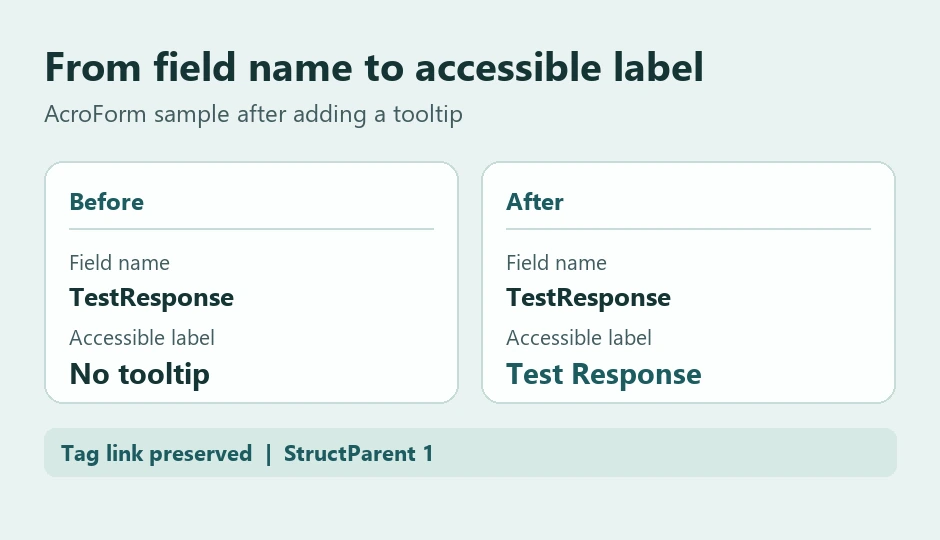
The example adds Test Response to the existing TestResponse field. Independent parsing confirmed the widget still has StructParent 1. Sample adapted from the veraPDF corpus (CC BY 4.0). The field name was changed.
| Tool | What it does |
|---|---|
| Form Labels | The example adds Test Response to the existing TestResponse field. Independent parsing confirmed the widget still has StructParent 1. Sample adapted from the veraPDF corpus (CC BY 4.0). The field name was changed. |
| Try67 Import/Export Tooltips | US$25 Acrobat add-on that imports reviewed field tooltips from a text file editable in a spreadsheet. |
| Adobe Acrobat Pro | Paid editor with a wider set of accessibility checks and form controls. |
| FormForge | Free local form editor. It added a tooltip on the veraPDF test but the exported widget lost its StructParent link. |
The links describe each alternative's documented workflow.
$0
Open a sample or your own files and inspect the result before deciding whether to export.
US$7 per form batch
Pay once to download the full result shown in your preview.
Already paid? Restore your purchase.
Use existing unsigned AcroForm PDFs. Use a tagged PDF when you need to retain an existing widget’s link to the structure tree.
Yes. Use a CSV with field,label or file,field,label. Use the exact names from the audit.
This tool patches field names. Review navigation, reading order, instructions and other requirements separately.
The tool targets missing tooltips; the preview shows which fields will change.
The preview is free. Each form batch is US$7, charged once at download.
Your files are processed in your browser. Stripe handles checkout separately.
No account is needed. Complete Stripe Checkout and return to this browser to download the result.
Open this tool in the same browser and select Restore purchase. Prepared exports are kept locally for up to seven days.
Follow the workflow and check the formats the tool supports.
See what stays in the browser and what Stripe receives at checkout.
Find out how to recover a purchase and which details to keep.
Open the tool and preview the result for free.